
When people need a product, service, or answer, many of them turn to Google Search. For businesses, this creates an opportunity to reach potential customers while they are actively looking for relevant information.
Google Ads is an online advertising platform that helps businesses promote their products and services across Google’s advertising network.
For example, a web development company may want to reach people searching for website development services. A carefully planned Google Ads campaign can help the company show relevant advertisements to eligible users.
But how does Google Ads actually work? What campaign types are available, and how can beginners get started?
This guide explains the essential concepts you need to understand before launching your first campaign.
What Is Google Ads?
Google Ads is Google’s online advertising platform. Advertisers use it to create campaigns, choose their marketing goals, define targeting settings, set budgets, and deliver advertisements across eligible placements.
Depending on the campaign type, advertisements may appear on Google Search, YouTube, Google Display Network placements, and other supported properties.
Unlike organic search engine optimization, which focuses on earning unpaid search visibility, Google Ads provides paid advertising opportunities.
However, paying for advertising does not guarantee clicks, leads, or sales. Results depend on factors such as campaign settings, competition, ad relevance, landing-page experience, and the offer itself.
How Does Google Ads Work?
Google Ads uses different systems depending on the campaign and advertising placement. Search advertising is a useful starting point for understanding the basics.
1. Choose a Campaign Goal
Start by identifying what you want to achieve.
Common objectives include:
- Generating leads.
- Increasing website sales.
- Promoting a product or service.
- Encouraging relevant website visits.
- Building awareness for a brand.
Your goal influences which campaign type, bidding strategy, and conversion actions may be appropriate.
2. Select a Campaign Type
Google Ads offers different campaign types for different advertising needs.
For example, a Search campaign can help you reach people searching for relevant terms, while a Video campaign can help you advertise through eligible video placements.
Choose a campaign type according to your audience and objective rather than selecting one simply because it is popular.
3. Define Your Audience and Targeting
Depending on the campaign type, you may configure location, language, keywords, audience segments, placements, and other targeting options.
For example, a local website development agency may focus its campaign on the geographical areas it serves.
Careful targeting helps reduce irrelevant exposure, although no targeting setup is perfect.
4. Create Your Advertisement
Your advertisement should communicate what you offer and why it is relevant to the person seeing it.
For a website development service, an ad might emphasize custom website creation, responsive design, or a consultation offer—provided these accurately reflect the business.
Use clear language and avoid claims you cannot substantiate.
5. Set Your Budget and Bidding Strategy
Your budget determines how much you are willing to spend within the configured budget settings. Your bidding strategy influences how Google Ads participates in advertising auctions or optimizes toward your chosen objective.
Some campaigns focus on clicks, while others may optimize for conversions or conversion value when suitable data is available.
Your actual spending and results can vary, so monitor the account rather than assuming that a budget automatically guarantees a particular number of visitors.
6. Measure and Improve Performance
After your campaign begins serving, review its performance.
Useful metrics may include impressions, clicks, click-through rate (CTR), average cost per click (CPC), conversions, conversion rate, and cost per conversion.
Choose metrics that reflect your objective. A campaign designed to generate qualified leads should not be evaluated only by how many clicks it receives.
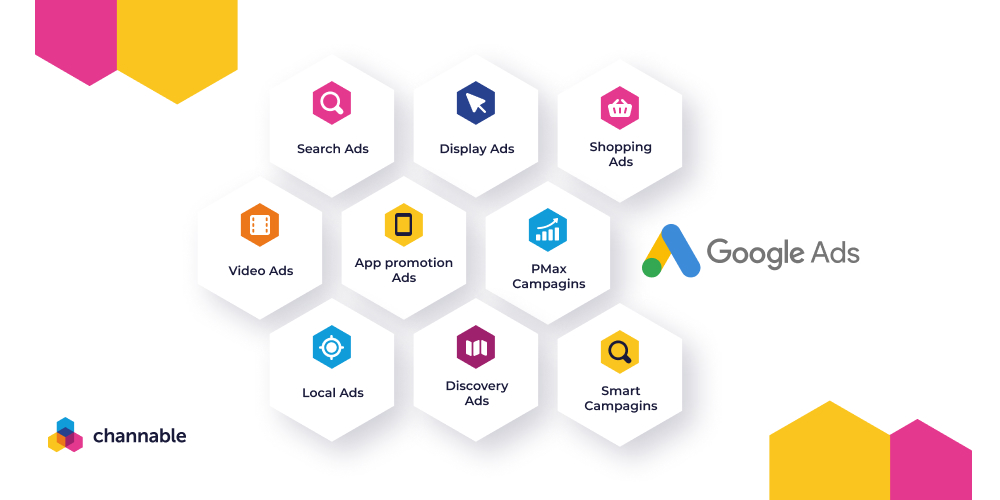
Main Types of Google Ads Campaigns
Search Campaigns
Search campaigns can show text advertisements to people searching for relevant terms on Google.
They are often useful when potential customers already have a clear need.
Example: A person searches for “website development services,” and a relevant business advertisement may be eligible to appear.
Display Campaigns
Display campaigns can help businesses reach people through eligible websites and apps within Google’s Display Network.
They can support awareness and remarketing objectives, depending on the campaign configuration and applicable policies.
Video Campaigns
Video campaigns can deliver advertisements through supported video placements, including YouTube.
They may be useful for product demonstrations, brand storytelling, or other video-led marketing objectives.
Shopping Campaigns
Shopping campaigns help eligible retailers promote products using product information, such as images, prices, and store details, through supported Google placements.
They require appropriate product data and account setup.
Performance Max Campaigns
Performance Max is a goal-based campaign type that can access multiple Google advertising channels through a single campaign, subject to eligibility and settings.
It can be useful for advertisers seeking cross-channel reach, but campaign results still depend on conversion tracking, assets, budgets, and other factors.
App Campaigns
App campaigns can help promote mobile apps and encourage actions such as installations or in-app activity.
The most suitable campaign type depends on your business model and objective.
How Much Does Google Ads Cost?
There is no single fixed price for Google Ads.
Costs can vary according to your industry, location, competition, campaign type, bidding strategy, and the value of the customers you want to reach.
For example, a highly competitive service keyword may cost more per click than a less competitive search term. Even then, a more expensive click may be worthwhile if it generates profitable customers, while a cheap click may produce no business value.
Before launching a campaign, decide how much you can afford to test and what result would make the campaign worthwhile.
How to Get Started With Google Ads
If you are a beginner, follow these steps:
- Create or access your Google Ads account.
- Define a clear business goal.
- Choose an appropriate campaign type.
- Research relevant keywords or other targeting options.
- Prepare accurate, relevant ad copy and assets.
- Set a realistic budget and bidding strategy.
- Configure conversion tracking where applicable.
- Review all campaign settings before publishing.
- Monitor results and make evidence-based improvements.
Avoid making too many changes at once. A structured testing process makes it easier to understand what is working.
Conclusion
Google Ads gives businesses a way to advertise through Google’s network and reach potential customers based on campaign settings, targeting, and advertising objectives.
To use it effectively, start with a clear goal, choose the right campaign type, create relevant advertisements, manage your budget carefully, and measure meaningful results.
Successful advertising is not simply about spending money to get clicks. It is about reaching the right people and creating a useful path from the advertisement to the desired action.